Easy 5-15 min PLAPETGTPUABSASA
First Layer Too Thin
The first layer is over-squished, rough, transparent, or scraped by the nozzle.
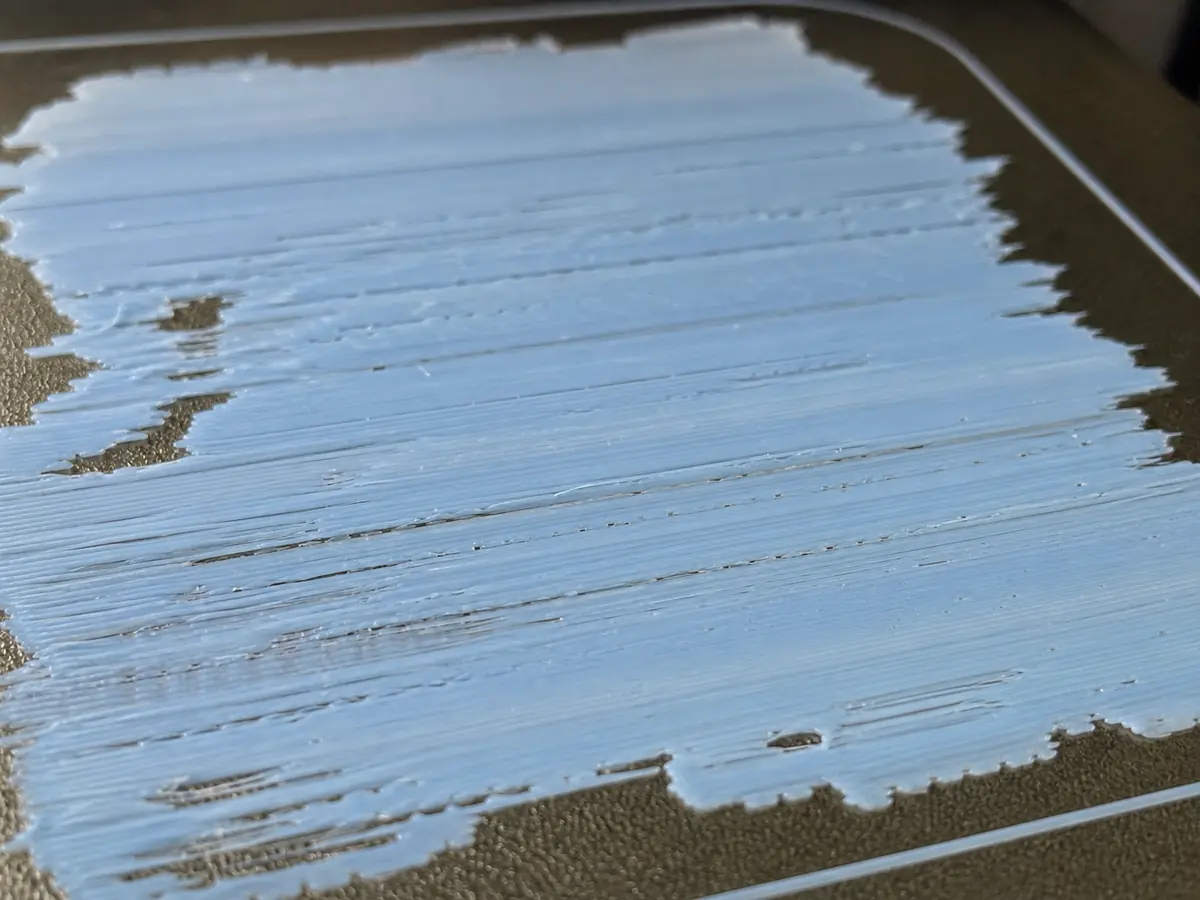
Likely causes
Z offset is too low
Raise Z offset slightly until the line is flattened but still has visible plastic volume.
Bed mesh or leveling is off
Clean the nozzle, re-run leveling, and check that the bed plate is seated correctly.
Flow is too high on the first layer
If Z height is correct but the layer is still overloaded, reduce first-layer flow a few percent.
Recommended settings by material
| Material | Nozzle | Bed | Fan |
|---|---|---|---|
| PLA | 195-210 C | 50-60 C | 80-100% |
| PETG | 230-245 C | 70-80 C | 30-60% |
| TPU | 220-235 C | 40-50 C | 30-50% |
| ABS | 240-260 C | 95-110 C | 0-30% |
| ASA | 240-260 C | 95-110 C | 0-30% |
Prevention tips
Change one setting at a time and reprint a small test piece.
Keep filament dry and store open spools in sealed bags or dry boxes.
Clean the build plate regularly and verify the correct slicer profile before long prints.
Related problems
Last reviewed Jun 15, 2026. Troubleshooting content is for reference only.